Why get a quote signed
A quote is where the price is agreed. A signed one means your customer accepted exactly that price and work, and you have the record.
- No surprises on the bill. The price, VAT and what's included, accepted before you start.
- Easy to track. It shows as Accepted in the app.
- Straight to an invoice. When the job's done, turn the accepted quote into an invoice.
- If there's a dispute. A record of exactly what was accepted, and when.
With AgreeVia, your customer signs from a link on a phone or computer, with no account or app needed. Everyone gets the same signed PDF, and every view and signature goes into a tamper-evident audit trail. Are electronic signatures legal in the UK?
What it is
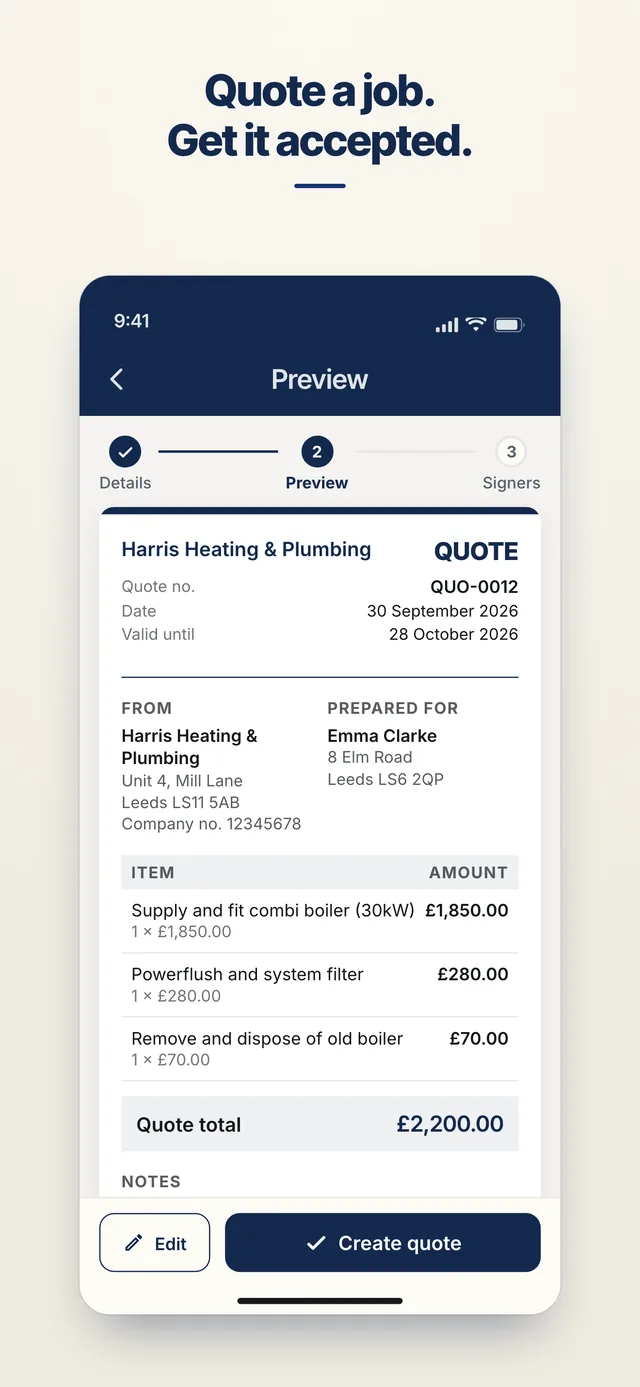
A quote is where a job is priced and agreed. When your customer signs it, it shows as Accepted, and you have a record of exactly what they accepted.
What you fill in
- Your business name, address, email and phone, plus a VAT number and company number if you have them
- Your client's name, address and email
- Items with a description, quantity and unit price. Negative prices work as discounts
- A VAT rate per item (20%, 5%, 0% or exempt) if you charge VAT
- The date, and how long the quote is valid for
- Notes, and a title for your documents list
Numbering: QUO-0001, then QUO-0002 and so on, or type your own number. Your details are filled in from your last invoice next time.
After you create it
When a quote has been accepted, one tap on Turn into invoice fills in a new invoice from it and prints the quote reference on it.
If your client is a private person, switch on Client is a private person. The quote then includes their 14-day right to cancel and a cancellation form, as the law requires, and they can ask you to start sooner when they sign. For full job terms (deposit, access, changes, materials and a workmanship guarantee), use the Commercial Job Quote for a business, or the Domestic Job Quote in the app for a home job.
In the app
Send it to sign
- Add who signsChoose people from your contacts, or send a link by email to anyone else.
- They sign on their phoneSigners open the link in their browser and sign. They don't need an account or the app.
- Keep the proofEveryone gets the signed PDF. Every view and signature goes into a tamper-evident audit trail, and you can generate an evidence package and check the document at agreevia.co.uk/verify.
Good to know
- AgreeVia works out the totals, and the VAT on each rate, to the penny. It is not an accounting package, and it does not take payment: your bank details are shown on the invoice for your client to pay you directly.
- You are responsible for the VAT and tax treatment of what you issue. If you are unsure whether a layout meets HMRC's rules for a VAT invoice, check with your accountant.
- Invoices, quotes and uploads all count towards the 3 free documents a month on the free plan. Pro removes the limit.
If you have a logo, name and colours set up on AgreeVia Pro, they are added to the document automatically.
Quote template FAQs
Is it free?
Yes. Invoices, quotes, deposit and pro-forma invoices are on the free plan, and each one counts towards your 3 free documents a month.
Can I turn an accepted quote into an invoice?
Yes. One tap on Turn into invoice fills in a new invoice from it and prints the quote reference on it.
What if my customer is a private person?
Switch on Client is a private person. The quote then includes their 14-day right to cancel and a cancellation form, and they can ask you to start sooner when they sign.
Does AgreeVia take the payment?
No. Your bank details are shown on the document and your client pays you directly. AgreeVia isn't accounting software.
Related templates and guides
Fill it in and send it to sign
Free, no card needed. Already have an account? Sign in. AgreeVia works in your browser and is on the App Store and Google Play.