Why freelancers need a signed contract
Most freelance disputes come down to "that's not what we agreed". A signed contract settles it before the work starts, not after the invoice is late.
- The scope. The services and dates in writing, so extra requests become extra work, not free work.
- Getting paid. The fee, how it's worked out and when it's due, signed by your client.
- Who owns the work. Intellectual property and confidentiality are settled before you hand anything over.
- Private clients. For a private person it gives the cancellation information the law requires. Without it, their 14 days to cancel can run on for up to a year.
With AgreeVia, your client signs from a link on a phone or computer, with no account or app needed. Everyone gets the same signed PDF, and every view and signature goes into a tamper-evident audit trail. Are electronic signatures legal in the UK?
Who it's for
For freelancers, consultants, designers and tutors. Tell it whether your client is a business or a private person: for a private person it adds the 14-day right to cancel, the cancellation form, and the other protections the law gives consumers.
Included on the free plan. It counts towards your 3 free documents a month.
Status
This template has been reviewed by AgreeVia, but not by a solicitor. It is a starting point, not legal advice: read the finished document carefully and check it suits your situation before you sign.
What it covers
- Parties, the services and a start date (and an optional fixed end date)
- Fee as a fixed price, per day or per hour, and when the client pays
- Independent-contractor status, intellectual property and confidentiality
- Liability, how either side ends the agreement, and general terms
What you fill in
- Your details and the client's
- A description of the work and deliverables
- Start date, fee and how it is charged
- Payment timing: pick a common option or write your own
- Notice period: 7, 14 or 30 days
- Governing law: England and Wales, Scotland or Northern Ireland
What's in the template
Covers parties, services, fees and payment, status, intellectual property and confidentiality, data protection, liability, ending this agreement, your right to cancel, plus the standard general terms. Some clauses are optional. You see the full wording in a preview before anything is sent.
In the app
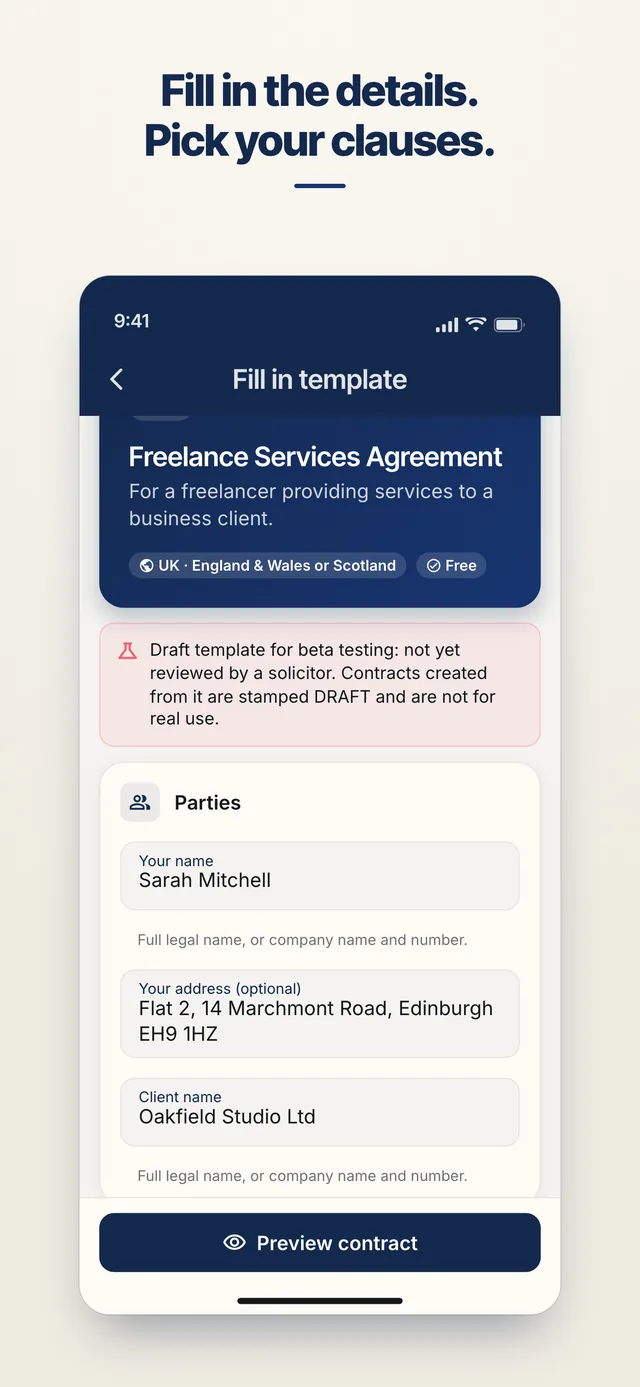
Then send it to sign
- Fill it inAnswer a few plain questions and switch optional clauses on or off. You see a preview before anything is created.
- Add who signsChoose people from your contacts, or send a link by email to anyone else.
- They sign on their phoneSigners open the link in their browser and sign. They don't need an account or the app.
- Keep the proofEveryone gets the signed PDF. Every view and signature goes into a tamper-evident audit trail, and you can generate an evidence package and check the document at agreevia.co.uk/verify.
Every template lets you choose England and Wales, Scotland or Northern Ireland as the governing law. Templates are provided for general use and are not legal advice.
Freelance Services Agreement FAQs
Is the Freelance Services Agreement free?
Yes. It's included on the free plan, and counts towards your 3 free documents a month.
Can I use it with a private client, not a business?
Yes. Tell it your client is a private person and it adds the 14-day right to cancel, the cancellation form and the other protections the law gives consumers. If they want you to start sooner, they tick a box to ask for that when they sign.
Can I charge by the day or the hour?
Yes. The fee can be a fixed price, a day rate or an hourly rate.
Does the other person need an account?
No. They open a link in their phone or computer's browser, read it and sign. They don't need an account or the app, and everyone gets the signed PDF.
Has a solicitor checked it?
No. It has been reviewed by AgreeVia, not by a solicitor. It's a starting point, not legal advice, so read the finished document before anyone signs it.
Related templates and guides
Fill it in and send it to sign
Free, no card needed. Already have an account? Sign in. AgreeVia works in your browser and is on the App Store and Google Play.
The wording of this template is © AgreeVia Solutions Ltd. Use it in AgreeVia; please don't copy it to republish or sell.